From WordPress to Next.js + Supabase: Why (and How) I Rebuilt My Own Site
I need to say something first: I like WordPress. I've built on it for over fifteen years. It fed my family. Some of my favorite client projects run on it right now, and I'm not one of those developers who discovered React last year and now thinks PHP is a war crime.
So when I tell you I moved my own site off WordPress this year, understand that I didn't do it for fun, and I didn't do it because of a Twitter thread. I did it because I lost an afternoon debugging a plugin conflict on my own website and thought: I would never accept this from a client project. Why do I accept it from mine?
The real reason
Here's the thing nobody tells you. The decision isn't really about WordPress vs. Next.js. It's about what your website is.
Mine had quietly stopped being a website. Clients log in to a portal. They see their hours, their invoices, their work history. There's subscription billing. There's a desktop time-tracking app syncing data into the same database. At some point I looked at it and realized I wasn't running a site with some extra features bolted on. I was running a product, and I was running it on a CMS from 2003 held together with plugins.
WordPress never did anything wrong. I just kept asking it to be something it isn't.
What the new stack looks like
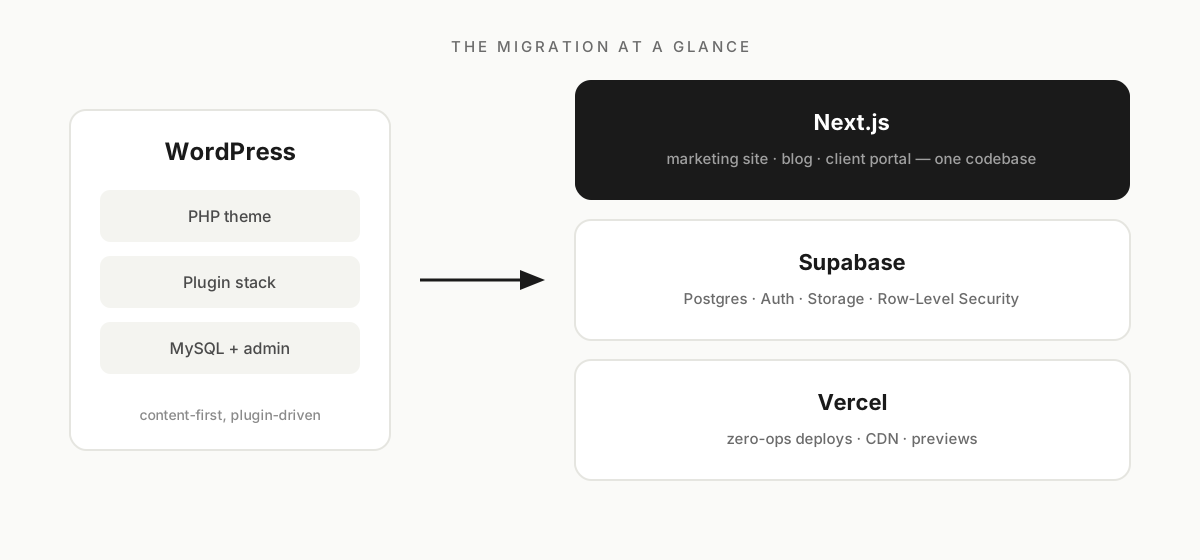
Next.js renders everything now, from the marketing pages you're reading to the client portal behind the login. Supabase replaced MySQL and about six plugins in one move: it's Postgres with authentication, file storage, and proper row-level security built in. Vercel does the hosting, which means my Sunday evenings no longer involve PHP version upgrades.
And before you ask: yes, I can still edit my content without touching code. It lives in a database with an admin panel, same as before. I didn't give up the one thing WordPress is great at. I gave up everything else it made me carry.
What the migration taught me
Three things, learned the mildly painful way.
First: do the content modeling before writing a single line of code. I mapped every post, page, service, FAQ and testimonial to a Postgres table on paper first. Boring work. Saved me weeks.
Second: SEO doesn't die from migrations, it dies from sloppiness. Keep your URLs. Set your canonicals. Regenerate the sitemap from the database. Google mostly doesn't care what your site is built with; it cares that yesterday's links still work today.
Third: run both sites in parallel and switch off WordPress last, not first. The day you feel brave enough to kill the old site early is exactly the day you shouldn't.
So, should you?
Maybe not! I mean it. If your site is a blog, a brochure, a publication with editors who live in the WordPress admin, stay put. You'd be trading a system your team knows for a system your developer likes, and that's a bad trade. I still happily build WordPress sites for clients where it fits.
But if you recognized yourself three paragraphs ago — logins piling up, dashboards, billing, a plugin stack you're scared to update — then your website is trying to tell you it wants to be a product. It's worth pricing out the move properly instead of adding one more plugin to the pile.
That pricing-out conversation is literally what I do, so get in touch if you want a straight answer for your specific case. Or nose around my recent projects first and see how I build.